
← Nirvedha CoachOS
Win the client · Pipeline
Every lead, through to a signed agreement
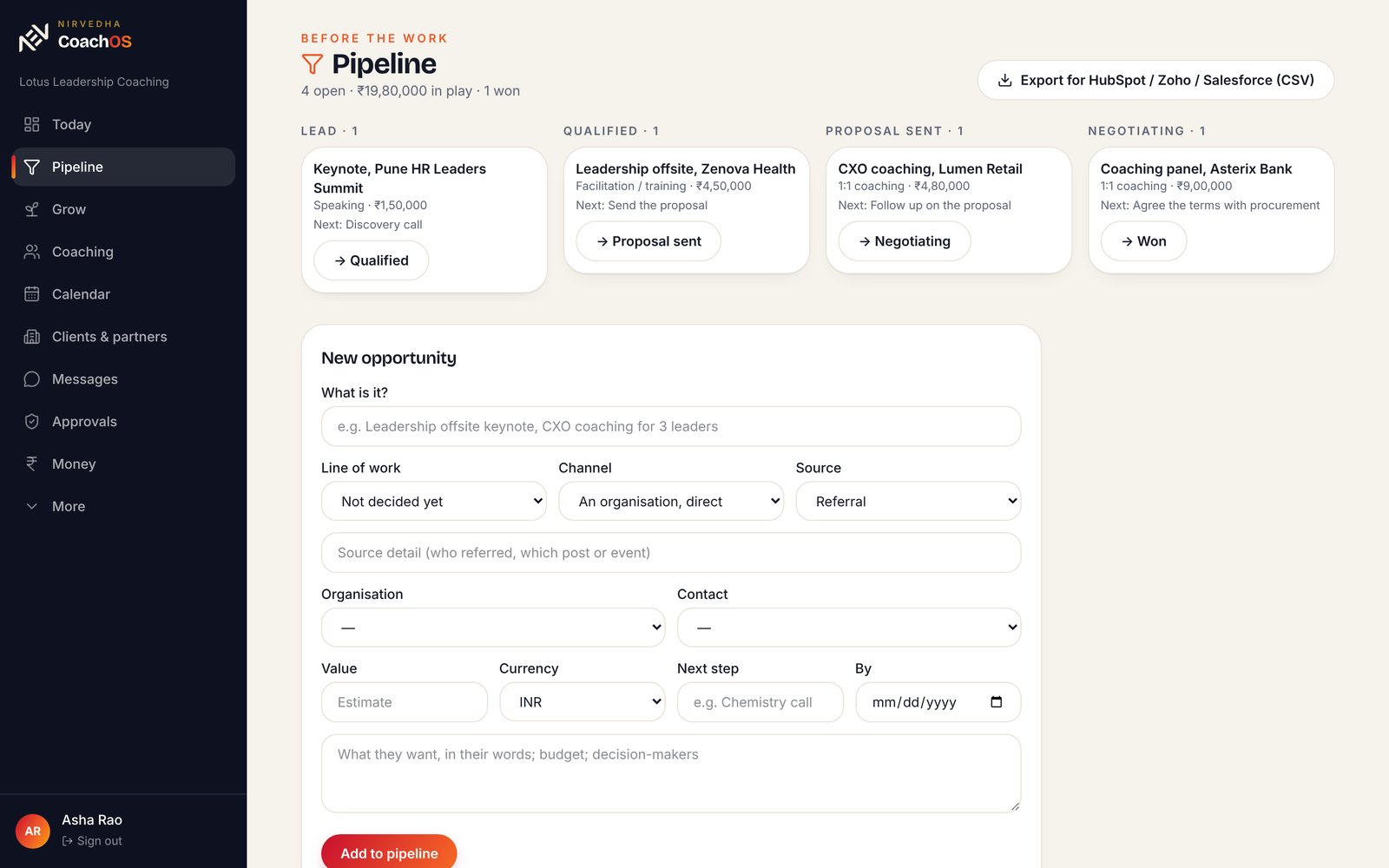
Each opportunity moves through clear stages, the proposal is drafted from it, and a won one becomes the engagement with its parties and value already filled in.
What it does
Pipeline
An opportunity records what the work is, the line of work (coaching, a workshop, a talk, consulting, a fractional or board role) and how it reached you: an organisation, an agency or bureau, a platform, a sponsor or an individual.
It moves through Lead, Qualified, Proposal sent, Negotiating and Won, or On hold, or Lost with a reason. Each column shows its value.
In Core, and so in the Grow tier too. What each tier costs
How it works
- 1Add the lead. From Today press New lead, or open Pipeline. Bookings from your booking page arrive here on their own.
- 2Draft a proposal. On the opportunity. Edit it, add signers and send. The client accepts or asks for changes by their own link; a new version switches the old link off.
- 3Convert when won. The engagement or piece of work opens with the parties and value filled in.
- 4See how you are doing. Practice reports show the pipeline by stage and your win rate. Contacts and the pipeline export as CSV with column names CRMs recognise.
More in Win the client
A first conversation booked on your own page, the opportunity tracked, the agreement e-signed.