
Win the client · Booking page
A page where people book a first conversation with you
Your own booking page offers times only when you are really free. Each booking becomes a contact and a lead in your pipeline, with the call as the next step.
What it does
Booking page
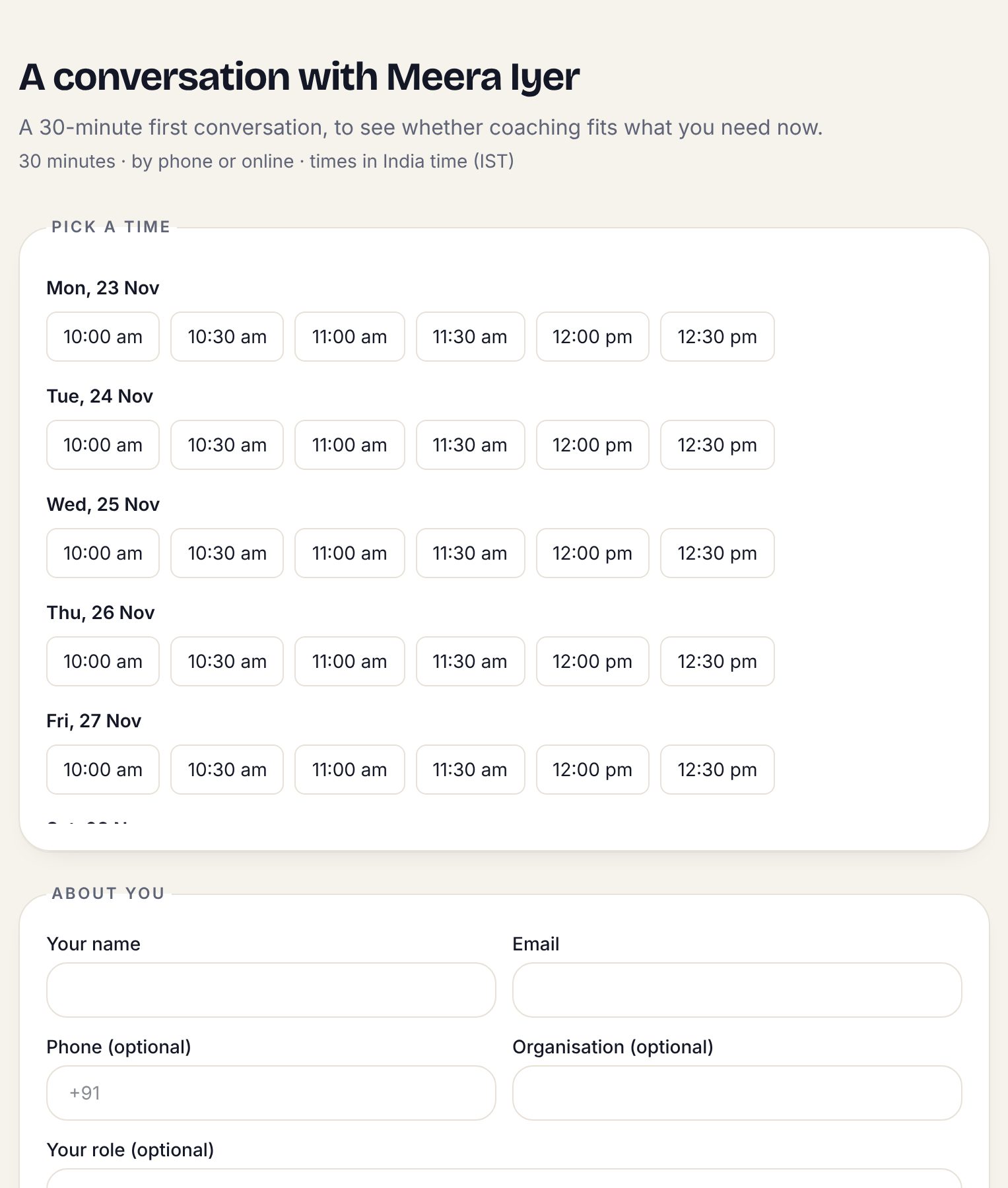
You set the call's length, your hours (India time, one window a line, such as Tue-Fri 17:00-19:30), the notice you need, how many days ahead to offer and a gap around anything busy. Times never fall over a session, another booking or an event in your Google or Outlook calendar.
The person who books gets an invitation with a calendar file and a link to cancel. You get a note and the same file.
In Core, and so in the Grow tier too. What each tier costs
How it works
- 1Switch the page on. Settings → Booking page: a name for its address, your hours and the rest. Add your video room and a line for visitors if you like.
- 2Share the link. On your website, your LinkedIn profile or your email signature.
- 3A booking arrives. It is a contact and a lead in the pipeline, with the call as its next step.
What others see
The person booking. Your name and line, free times by day, and a short form: name, email, and optionally phone, organisation and role.
More in Win the client
A first conversation booked on your own page, the opportunity tracked, the agreement e-signed.