
Set up · Engagements
One page for each coachee, from who pays to the final report
Set up each engagement once: who is paying, how many sessions and how the client pays. Every agreement, invoice, reminder and report after it follows from that.
What it does
Engagements
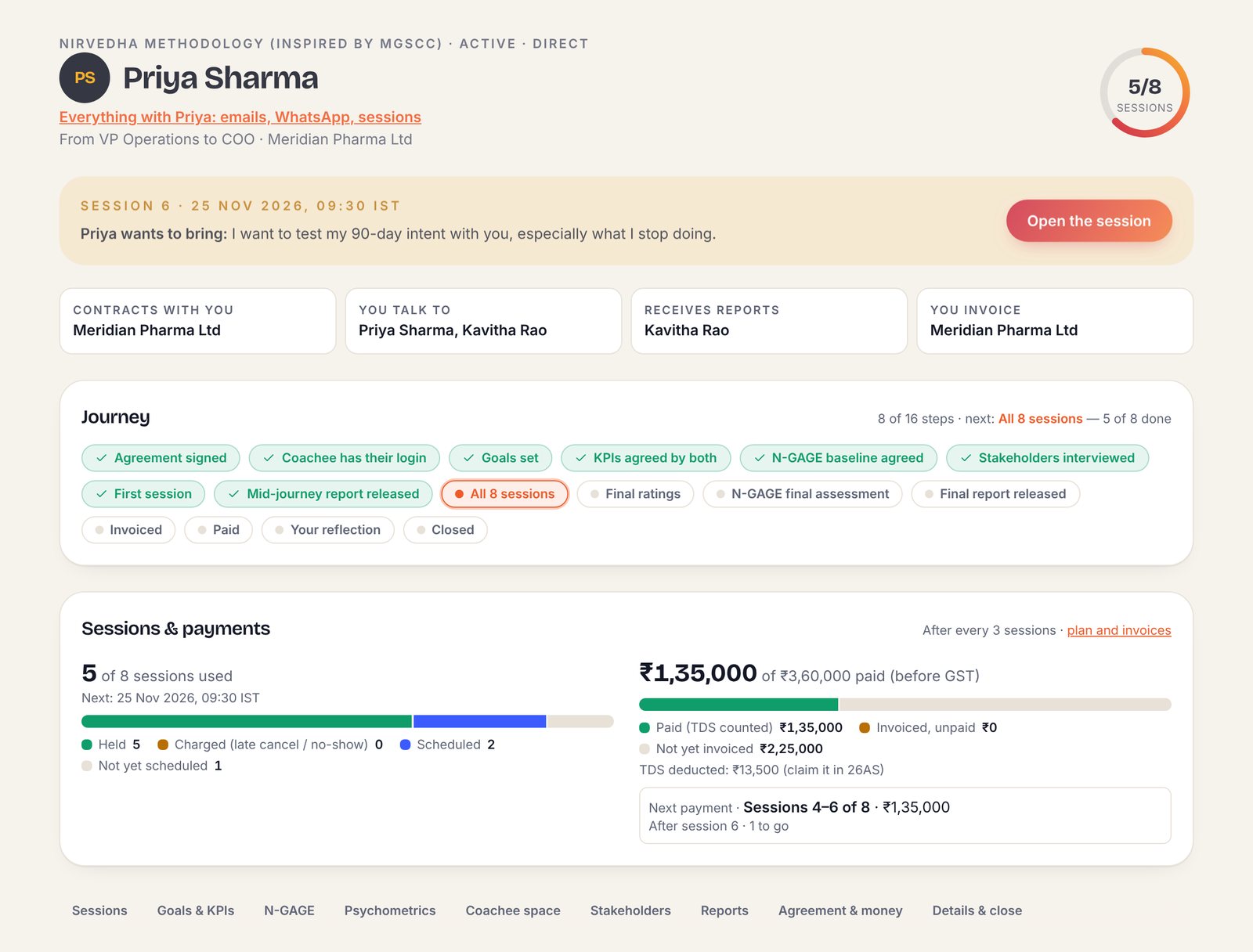
The first question is who is paying for the coaching: their organisation, an agency, a coaching platform, a sponsor for its clients, the coachee, or nobody (pro bono). The answer sets who you contract with, who gets reports and who you invoice, shown on a strip at the top of the engagement.
Under it, a journey tracker ticks its steps off from what actually happened, and shows the next one with a hint. Then sessions and payments, and tabs for sessions, goals, the coachee's space, stakeholders, reports, the agreement and money.
In Core, and so in the Grow tier too. What each tier costs
How it works
- 1Start the engagement. Channel, client, contact, coachee, method, sessions agreed, fee and how they pay.
- 2Goals and measures. Goals in the coachee's words. A measure you propose counts only once the coachee agrees it in their portal.
- 3Pause, close or follow on. Pause with a reason, close with an alumni follow-up date that returns on Today, or start a follow-on with the same parties.
- 4When things change. If a coachee leaves their company and carries on alone, switch the channel: sponsor sharing stops at once and the change is logged.
More in Set up
Each engagement set up once, sessions in your calendar, and anything to a sponsor held for your approval.